Showing posts with label blog. Show all posts

Sunday, June 21, 2015

Digital Badges - Part 1 of 3. Setting up Digital Badges.

This post is intended to be the first of three posts about Digital Badges. 
Part 1 is the 'How' Part 2 the 'Why' and Part 3 the 'Outcomes'. I am writing the 'How' before the 'Why' as I am still grappling with an idea - "Do Digital Badges led to extrinsic motivation and fixed mindsets'? (would love anyone's opinion on this)....

Digital Badges are 'Brownie Badges for your Blog'. They could be for any achievement; from completing Triathlons to Learning a musical instrument. Here is my recommended process of how students can earn these badges.

1) Explain the concept of Digital Badges to your students (maybe bring a Girl Guide/Brownie/Scout uniform to show 'old school badges') Have students brainstorm a list of what badges could be awarded for. This list does not have to be definitive. I had 3 criteria for my students;

  1. It has to be an achievement that is accessible to anyone i.e. winning a musical scholarship for 10 year old is accessible to all 10 year olds as any 10 year old could apply. Riding the tallest rollers coaster at Disneyland is an achievement - but not everyone has the opportunity to do this.
  2. It has to be able to be self-managed by students. By this I mean students need to be able to know if they have achieved this, so a 'kindest person in the class award' is not appropriate as it would require others (teacher) to determine. Having 20 'gems' in your writing book can be self managed though, as the teacher indicates these in their feedback and students can count them.
  3. It has to be measurable. 'Being good at cricket' is not measurable. 'Being in a Rep Team for cricket' is.
2) Have student make badges. I used www.openbadges.me as it works with our students iPads and Chromebooks and is pretty easy. You could also use Google Drawing or Paper and Pen (then take a photo). You only want one student making each badge, so have students write their name or cross out ideas as they begin to create their badge.

3) Store badges in a shared location or have students share badges with you. This is where my method splits into 3 methods.. 
Method 1 (quick and easy) is to have all the badges stored in one Google Drive folder that is shared with all students. 
Method 2 (requires some work from the teacher - but may be essential) Is to have all the badges, along with a description of how to achieve them, on a Class Website/Blog.
If you are all about quick and easy jump down to Step 5!
Method 3 (slower, but with more transparency) is to have students share the badges with you, then....

4) Create a Google Form for each badge. See the form example below. The main purpose for having a form is so a teacher can look at the 'Google spreadsheet' that the form automatically creates and quickly see students that have been awarded badges. The Google Form collects students login name, adding extra transparency to the process. Overall, I feel that the form makes students take more responsibility than simply having a folder they can access and download badges from - but really depends on the students as to what method to use!

Forms would then need to be embedded or linked from a central location (your class blog/website) for students to see what badges are available.
Here is a link to a live form to see how they look.

5) Let students Save the badges and upload to their Blog. At any time, students can go to the shared folder or Blog/Website that hosts the 'Badge Forms' or 'Badge Images and descriptions' and save/copybadges. They will then need to upload/paste the Badge Image into a Blog Post or Digital Portfolio.

My expectation is that some reflection needs to be included when students post their badges to their own blog. e.g. "Here is my Eco-Warrior badge for being part of the Eco-Warrior team in 2015. I am proud to be in this team as a lot of students wanted to be in it. I am also proud because I think the work we do is really important, like composting and recycling".

Tuesday, June 16, 2015

Embed a Google Drive video

Videos are so important in sharing learning. I have found the most effective video sharing tool to be Google Drive as;


- It is really easy to add videos to Drive from any device - including iPads and Chromebooks
- Videos can be shared with others easily (i.e. a video project can be shared with each member of the group)
- No 'related videos' that appear to the side and at the conclusion of your video (like on YouTube)
- Can be embedded just like a YouTube video. 
This last statement does not seem possible at first, so here are my 5 steps to embed a Google Drive video into any website.
  1. Go to Drive and open the video (it will open in a preview mode)
  2. Once the video is viewable - Click the open button (this will open the video in ‘full’ mode).

3) Click the Share button (persons head) and ensure that other people can see your video. By selecting “Anyone with the link can view” only people who have the exact url will be able to view.


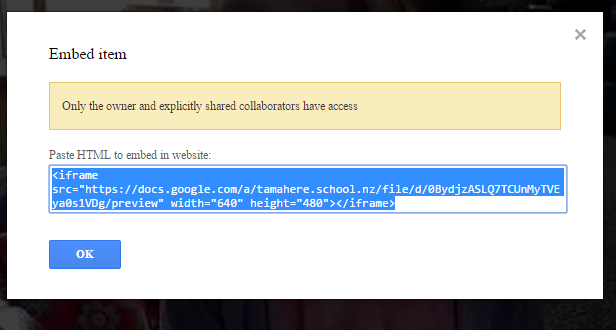
4) Click the Menu Bar (3 Dots) you will click on the “Embed Item” option.


5) Copy the embed code (click once and the whole code will be selected, then COPY).


On an iPad you  need to go to drive and click the info icon next to video.
Then click on Get Link - it will copy the URL link.
Then paste this link into a browser (Chrome).
You can then get the embed code the same way.
A little harder, but works well.

Tuesday, December 2, 2014

Top 5...Reasons I like Kid Blog

UPDATE - KidBlog have a new version of their platform. Check out my review here


  1. Post Broadcast. As a teacher, I can broadcast any blog post to any other class in the school - read that again and think of the possibilities.....cutting down the workload anyone?


  1. Ease of Use. Our 6 year old's use Kid Blog, mainly due to their simple login system where users select their name from a drop down list, then type in their password or click the 'Login with Google'...The Apple App (need to keep the list to 5, so will throw into Ease of Use) is simplistic yet covers everything you need - including shooting video or using the camera from within the App.


  1. Google integration. Login's through Google and 1-click posting of any content from your Google Drive account makes Kid Blog integrate better with Google - perhaps even better than than Google's own Blogger!


  1. Customisable. From students selecting their own themes to teachers selecting how they want to modify comments, Kid Blog have a lot of options!  
  1. End of Year 'Transfer'. I have been reading about the dilemmas some schools are currently having with what to do at the end of the year with students blogs - after all, does a child really want to continue with the same blog they started as a 5 year old into Intermediate - how lame. Yet, what a waste to completely forget about it. With Kid Blog, each year a child's account remains open, you simply add them to additional classes (blogs). They get a clean slate at the start of the year, but (big but) they have a nice drop down menu where they can flick back to other years and reminisce :)


My Wish List (Yes Matt, I really want these things)
- For teachers to be able to post to students blogs (As a teacher) to praise, add a photo etc. This would be tumeke for Junior classrooms completing eportfolios.

- A KidBlog Android App - for my Galaxy Tablet!

- A KidBlog Chrome App, so we can all have the KidBlog icon in our Chrome Dashboards!

Thursday, November 27, 2014

Top 5...Reasons schools should stop paying for an LMS

1. Money is tight in schools. An LMS can cost thousands, some up front for a website and some ongoing costs.  

2. Integration. Integration is key in my world. If a website wants me to join and I can't use my Google account for single sign in, I look for an alternative. Sometime I cave in, but if I can avoid creating yet another username and password, I do at all costs. The same goes for LMS's and their lack of sign in options. Signing in is just the start, once in, I want students to access Google Drive, Evernote or Microsoft 360 in one click, If they have to upload everything, I am fast losing patience!  I can see that this may not be relavent for non-GAFE/360 schools, which begs the question - are they any non-GAFE/360 schools left??

3. Free and cheap alternatives exist. Some alternatives are much better. My favourite alternatives are Social Media tools, Google Sites, Evernote, Edmodo.com, Blogger, KidBlog and good old Wikispace! You may find that you need more than one of these tools to replace your LMS. 

I spent years mastering an LMS in a previous life. Then, like many teachers, I moved onto a new school that had a different LMS...and started the mastery again. How I wish that I could have mastered an open platform like Blogger and been able to take my skills with me into any new school, rather than being constrained by the limitations of a fixed system.

4. Student Management Systems (SMS) can/will communicate with parents without an LMS. A few years back the idea of having parents log in to view student data was appealing, and our trusty LMSs allowed this to happen, but why go to the trouble of integrating the two when you can go straight to the horses mouth in accessing through the SMS?

5. The Big Bad Wolf. LMSs talk a big game when it comes to 'security online'. The ship has passed on the idea that we need to lock our student in the 'kids internet' and assume they won't climb out the window into the 'real internet'. Netsafe and others focus has long been on education, and the false sense of security that teachers, parents and pupils get that an LMS is safe is concerning. Do teachers really think they will not venture out of all the content you have created within your LMS - and if my kids didn't venture out, I think I would be worried!

The questions that all schools need to ask is this. Why? Is it because our website is hosted with them? If so, I would suggest using a free tool like Weebly or Google Sites and talk to your community about their skills - you would be surprised at how many people would put together a website in their free time!