Showing posts with label BYOD. Show all posts

Monday, March 21, 2016

SAMR - Some Apps Model (without) Research

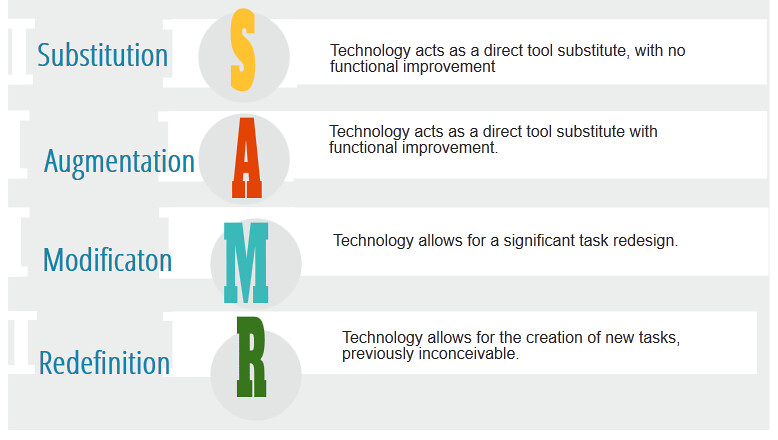
Recently, I was googling (creative commons free) images of the SAMR model and saw these images;


I could not help to question.....2 weeks later and I am making my own meme.


Why SAMR is like ordering 'pumpkin spice'.

  1. There is no research behind it. This shocked me. I have seen SAMR all over the show, at conferences, in publications and referenced by people I respect. How could it be that a model so widely used has no research behind it? What is confusing is watching Ruben Puentedura (the creator of SAMR - yes he has a PHD after his name, but for Chemistry - not Education) talk. He mentions research throughout, even stating that "redefinition tasks can improve student outcomes by as much as the equivalent of roughly 2 letter grades"..... the study that shows this 'jump' is unseen, like all of Mr Puentedura's research. Equally unfortunate is that he simply states 'student outcomes' without defining what student outcomes means. Does it mean progress, engagement, ability? Research from other people is cited in his talks, which is genuine, such as having an authentic audience improving student motivation, but no research is available that shows the SAMR model improves student outcomes. Without research, I think it gets relegated to an idea, not a model. 
  2. It is misunderstood. Countless examples of the interpretations of SAMR are around to the point that I do not even know what the correct interpretation is. I have watched Ruben Puentedura describe SAMR as a ladder model, with the end goal to reach redefinition. I have seen it being used as a planning model, with teachers assessing what 'level' of SAMR a learning activity or (gulp) App is. I have always thought of it as more of a 'check in' - something for teachers to consider, mainly to ensure they are not always at the 'substituting level'. By definition a model is something others can follow and we have no shared understanding about what SAMR is about.
  3. What is wrong with substituting? At times, substitution is fine, possibly essential. We may want to take notes on a device so we don't lose them or so we can copy and paste them into another tool at a later time to further analyse key ideas. Or we may find it quicker and more convenient to read a book on an eReader. The point is, there is no point analysing what 'level' a task is, as there is a time and place for all learning tasks.
  4. What is so great about redefinition? By definition, a redefinition task is a task that was 'inconceivable' before the tech. So that means cyber-bullying would fit great into redefinition, as would re-sharing cat videos on Facebook and messaging friends instead of visiting them. Newer is not always better. Sure, SAMR advocates would say 'of course these things are not redefinition - they are not even learning tasks' which is exactly my point. The model is not even about learning - it is about using technology. Which segways nicely into...
  5. Why are we placing technology on a pedestal? This has always bothered me. Why do we have a model that is supposed to 'level' a learning task only apply to learning with devices? Can other tools 'redefine' learning? I have seen some amazing Enviro-School projects that allows for tasks 'inconceivable' without a school vegetable garden. Are these tasks as important? Do we need a model to show 'types of Enviro-School tasks'? Would it improve our collective abilities to use school vegetable gardens if we did? 
I think the SAMR idea is an OK reflection 'tool' for teachers, whereby teachers can look back at their technology integration over a term/year and reflect on their use of technology. Has it always been simply substitution? Or has the technology gone beyond simply replacing 'pen and paper'? 

Until some serious peer reviewed research occurs, I believe we should focus on a more simple model - "Use technology purposefully'.

References

Sunday, June 21, 2015

Digital Badges - Part 1 of 3. Setting up Digital Badges.

This post is intended to be the first of three posts about Digital Badges. 
Part 1 is the 'How' Part 2 the 'Why' and Part 3 the 'Outcomes'. I am writing the 'How' before the 'Why' as I am still grappling with an idea - "Do Digital Badges led to extrinsic motivation and fixed mindsets'? (would love anyone's opinion on this)....

Digital Badges are 'Brownie Badges for your Blog'. They could be for any achievement; from completing Triathlons to Learning a musical instrument. Here is my recommended process of how students can earn these badges.

1) Explain the concept of Digital Badges to your students (maybe bring a Girl Guide/Brownie/Scout uniform to show 'old school badges') Have students brainstorm a list of what badges could be awarded for. This list does not have to be definitive. I had 3 criteria for my students;

  1. It has to be an achievement that is accessible to anyone i.e. winning a musical scholarship for 10 year old is accessible to all 10 year olds as any 10 year old could apply. Riding the tallest rollers coaster at Disneyland is an achievement - but not everyone has the opportunity to do this.
  2. It has to be able to be self-managed by students. By this I mean students need to be able to know if they have achieved this, so a 'kindest person in the class award' is not appropriate as it would require others (teacher) to determine. Having 20 'gems' in your writing book can be self managed though, as the teacher indicates these in their feedback and students can count them.
  3. It has to be measurable. 'Being good at cricket' is not measurable. 'Being in a Rep Team for cricket' is.
2) Have student make badges. I used www.openbadges.me as it works with our students iPads and Chromebooks and is pretty easy. You could also use Google Drawing or Paper and Pen (then take a photo). You only want one student making each badge, so have students write their name or cross out ideas as they begin to create their badge.

3) Store badges in a shared location or have students share badges with you. This is where my method splits into 3 methods.. 
Method 1 (quick and easy) is to have all the badges stored in one Google Drive folder that is shared with all students. 
Method 2 (requires some work from the teacher - but may be essential) Is to have all the badges, along with a description of how to achieve them, on a Class Website/Blog.
If you are all about quick and easy jump down to Step 5!
Method 3 (slower, but with more transparency) is to have students share the badges with you, then....

4) Create a Google Form for each badge. See the form example below. The main purpose for having a form is so a teacher can look at the 'Google spreadsheet' that the form automatically creates and quickly see students that have been awarded badges. The Google Form collects students login name, adding extra transparency to the process. Overall, I feel that the form makes students take more responsibility than simply having a folder they can access and download badges from - but really depends on the students as to what method to use!

Forms would then need to be embedded or linked from a central location (your class blog/website) for students to see what badges are available.
Here is a link to a live form to see how they look.

5) Let students Save the badges and upload to their Blog. At any time, students can go to the shared folder or Blog/Website that hosts the 'Badge Forms' or 'Badge Images and descriptions' and save/copybadges. They will then need to upload/paste the Badge Image into a Blog Post or Digital Portfolio.

My expectation is that some reflection needs to be included when students post their badges to their own blog. e.g. "Here is my Eco-Warrior badge for being part of the Eco-Warrior team in 2015. I am proud to be in this team as a lot of students wanted to be in it. I am also proud because I think the work we do is really important, like composting and recycling".

Tuesday, December 16, 2014

Top 5...Ways to shorten an Apps Wishlist


One of the exciting/daunting tasks of rolling out our BYOD programme was giving parents a list of Apps to download for their students iPads. When googling various schools lists, I got a shock that some lists came in over $100 and looked like they would leave little room on a 16GB ipad for media content.

Our aim in keeping our list short was wanting students and teachers to maximise the full potential of a few Apps rather than skim the surface of 30 odd Apps.

Enough people with more knowledge than me have shared lists of 'the best Apps for schools'. Here is my list of how to shorten these 'wishlist' of Apps.

1) Workflow. Workflow with any device is crucial. I was once at a school where a student proudly told me about a video they created. When I asked to see it, they said the video was on iPad #7. This is a direct response to not thinking through the workflow of Apps. 

All content created on an iPad should be able to be shared - with or without the original iPad it was created on. The answer to ensuring good workflow is ensuring your Apps work with;
-Your LMS/blogging platform App 
- Web Storage App. For us, this was Google Drive.  Google Drive is our go to App to save photos and videos.

 I am surprised at how many Apps do not produce embed code to add to blogs or upload options other than taking a screenshot.

2) Integration. As a GAFE school, we prioritised some Apps over others due to Google Integration, other Apps were winners as no sign-in and passwords were required. Apps that required users to be 13 and older / use Facebook to sign in had to be put to one side.


3) Avoid Duplicates. No school App list should contain Apps that achieve the same purpose. Obviously, all Apps have slight differences, but think about why you would use the App and if another App achieves this on your list. For us, Explain Everything,iMovie and Book Creator for iPad take the place of alot of Apps!

4) The Substitution Test. I do not believe that all Apps fit nicely into the SAMR model, in fact, give me any iPad App and 10 minutes of quiet thinking time away from kids and I could think of a possible Modification or Redefinition task. 

Where we did use the SAMR model was the Substitution test - are we just substituting something we already successfully do with an App? We have great hands on maths equipment, do we really need fake alternatives when we have the real thing? Likewise, our kids successfully gather around big bits of A2 and mindmap collaboratively. By each sitting in their own space and mindmapping on their own device, is the learning really enhanced?

5) Play, Test and Check! Sometimes, I download an App, play, and fall in love. "It is essential!" I tell myself. 

Then, I test it. I use it as it is designed to in the classroom. I start a task and complete it in its entirety, right down to posting the finished content on a blog. Only when wanting to post an Adobe Voice did I discover I had to have an Adobe account - and that I had to be 13 and above to do this. Likewise, some Apps respond well with limited text or images, bit soon 'run out of screen space' or lag. In my testing phase, I try to involve students, who often tell me things I never thought of - like "the web version of this is way better" or "I just use this other App (I already have) to do the same thing".

My final task is to check about all the things people complain of. Is the keyboard consistently responsive within this App? Can you easily navigate? Does it close off every time you attempt to save a video?


With all this in mind, here is our current 2015 Year 5 -6 iPad App list. Feel free to leave a comment about 'the best App' that we have not included! 


Tuesday, November 18, 2014

Top 5.....Things to sort before BYOD

1. Infrastructure. Goes without saying, have you got broadband, proper wireless, lockable cabinets/rooms, filtering, a network that someone can use?

2. A learning management system. This does not have to be a 'LMS' - it could be a blog (see reasons I like Kid Blog), Wiki, Web 3.0 page, Evernote or Social Media page(s). A central class space may link to 10 other pages - or be a ‘one stop place’ but it is known by teachers, principals, students and families so that none of us get tangled up and lost in the InterWeb. 

3. A lead classroom teacher(s). Having capable leadership is important, but a teacher who can walk the talk is unquestionable.

4. Local Curriculum. Consider your school and its special features. What makes your school different and special? What's your thing? Maybe you follow a Inquiry, Writing or Reading programme throughout the school? The obvious question then becomes how BYO will effect (e or a? I never know...) these special features - don't throw the baby out with the bath water and get rid of what you already do well - add to it!

5. A review plan. You are sure that your BYOD initiative will be successful, otherwise you would not bother, but how will you know it is successful? If the proof is in the pudding, just what flavour will the pudding be? Your review plan may include collecting formative and informative assessment, questionnaires with families, teachers and students and statistics of just how many new devices get into the hands of learners. A Staff Development Plan needs to coincide with achieving your goals - more devices = more teacher PD!